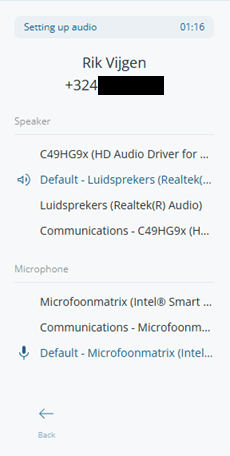



Audio Devices (Speaker & Microphone)
Tap Audio during a call to open the Device Settings panel. You will see two sections:
- Speaker — A list of all output devices detected by your browser. Click one to instantly route call audio there.
- Microphone — A list of all input devices. Click one to switch the mic used for the call.
If no devices are listed, the manual will read "No speaker devices found" or "No microphone devices found"; check your OS permissions for the browser.
Tap Back in the footer to return to the call. Your mute state is preserved.