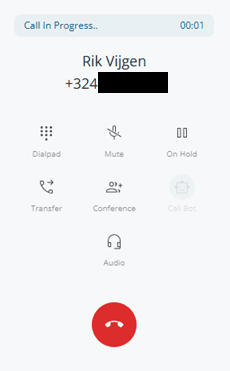



In-Call Controls
Once a call is established, the dialpad shows a grid of action buttons. Each button below describes what it does, when it is enabled, and what visual state it has.
| Button | What it does |
|---|---|
| Dialpad | Opens the numeric keypad for sending DTMF tones during the call (see DTMF). |
| Mute | Mutes your microphone. Highlighted while active. The other party will not hear you; you still hear them. |
| On Hold | Puts the current call on hold. The other party hears hold music (or silence, depending on your PBX). Disabled while an attended transfer is in progress. |
| Transfer | Starts an attended transfer flow: the call is put on hold and a directory appears so you can pick a transfer target (see Transfer a Call). |
| Conference | Starts the conference setup: you can dial a second participant and merge them in (see Conference Calls). |
| Call Bot | Toggles the AI call assistant on/off, if enabled for your account. Disabled while the bot is connecting. |
| Audio | Opens the device settings panel to switch microphone or speaker during the call (see Audio Devices). |
| Hang Up | Red button in the footer. Ends the active call immediately. |