


Transfer a Call
CloudEcho Phone supports two kinds of transfer:
- Blind Transfer — immediately hand the call off to another extension without speaking to them first.
- Attended Transfer — call the destination first, announce the caller, then complete the handoff.
Blind Transfer
1
While on a call, tap Transfer. The original caller is put on hold and a directory/search box appears.
2
Search for a colleague or type a number. Pick the target.
3
Tap Blind in the footer. The call is transferred immediately and you are returned to idle.
Heads-up
Blind transfers do not wait for the destination to answer. If the destination is busy or doesn't pick up, your caller may go to that extension's voicemail or be disconnected, depending on PBX configuration.
Attended Transfer (Warm Transfer)
1
While on a call, tap Transfer. The original caller is put on hold.
2
Search for and pick a transfer target from the directory (or type a number).
3
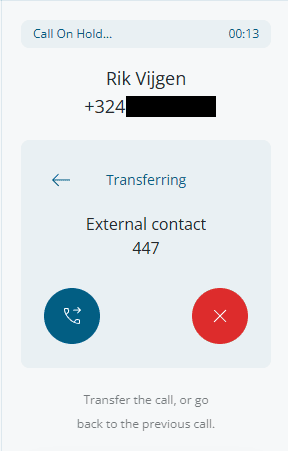
Tap Attended in the footer. The system dials the target. Status shows "Announcing call to ..." while ringing, then "Transferring" once the target answers.
4
Speak with the target to announce the caller.
5
When you are ready, tap Transfer to complete the handoff. The caller and the target are bridged together and you drop out. Or tap Cancel Transfer to return to the original caller and abort.
Back arrow during attended transfer
Tapping the back arrow returns you to the dialpad view (e.g. to send DTMF tones). It does not drop the transfer-target leg — both calls stay connected. To abort the transfer entirely, use Cancel Transfer.